Electric Standing Desk Setup: Ergonomics & Routine
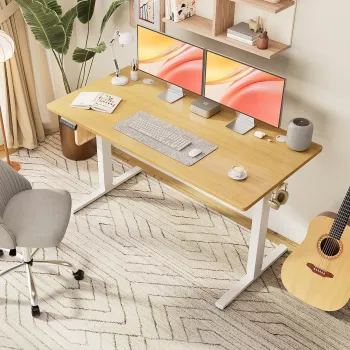
Electric Height-Adjustable Standing Desk for a Flexible Home Office Setup
A height-adjustable desk makes it easier to switch between sitting and standing throughout the day, helping create a more comfortable workstation for work, study, or creative projects. With an electric model, the change is quick enough that it actually happens—between tasks, between meetings, or whenever you notice you’ve been in the same position too long.
Below is a practical guide to choosing an electric standing desk, dialing in seated and standing ergonomics, and building a sit-stand rhythm that feels realistic in a home office.
Why an electric height-adjustable desk changes the workday
Long computer sessions can make anyone feel “stuck”—tight hips, rounded shoulders, and a creeping urge to slouch. An electric height-adjustable desk reduces friction by making posture changes easy and repeatable.
- It simplifies posture variety: alternating between sitting and standing can help break up long stretches in one position.
- It supports different users and tasks: typing, handwriting, video calls, crafting, and even quick household admin all benefit from a surface that meets you where you are.
- Effortless transitions are more likely to stick: when a desk moves with a button press, switching positions becomes a normal part of the day rather than a project.
- It works well in smaller spaces: a single desk can pair with different chair heights, stools, or a perch seat without feeling “wrong” for one setup.
Health organizations also emphasize the value of good workstation design and movement throughout the day. For ergonomic fundamentals, see guidance from OSHA’s Computer Workstations eTool and the Mayo Clinic’s office ergonomics guide.
Key features to prioritize before buying
Electric standing desks can look similar at a glance, but a few specs make a big difference once you’re using one daily.
- Height range: it should lower enough for comfortable seated typing and rise enough for relaxed standing with elbows near 90 degrees.
- Stability at full height: minimal wobble matters more than people expect—especially with dual monitors or a monitor arm.
- Lift capacity: add up the weight of monitors, laptop, docking station, speakers, books, and any monitor arm, then leave a margin.
- Controller and presets: preset buttons make it easy to save sitting and standing heights so posture stays consistent.
- Noise level: quieter motors are better for shared rooms, phone calls, and video meetings.
- Desktop size and layout: plan space for keyboard/mouse plus a real writing area; desk depth matters if you use a larger monitor or an arm.
- Cable management: grommets, clips, and under-desk trays prevent cord tugging during height changes.
Quick home office fit check
| What to measure | Target outcome | Why it matters |
|---|---|---|
| Seated elbow height | Keyboard at elbow level | Helps keep shoulders relaxed and wrists neutral |
| Standing elbow height | Keyboard at elbow level | Reduces reaching and upper-back tension |
| Screen distance | About an arm’s length | Supports comfortable focus and reduces leaning forward |
| Screen height | Top of screen near eye level | Encourages a neutral neck position |
How to set desk height for comfort (sitting and standing)
A standing desk helps most when the “default” positions are truly ergonomic—so switching doesn’t trade one discomfort for another.
Sitting setup
- Adjust the chair first: feet flat (or on a footrest), with hips slightly above knees if comfortable.
- Set desk height second: forearms should be roughly parallel to the floor when typing, with elbows close to the body.
- Keep wrists neutral: avoid bending wrists up to reach the keyboard; a slight negative tilt keyboard position can help some setups.
Standing setup
- Stand tall and relaxed: distribute weight evenly and keep a soft bend in the knees.
- Match desk height to your elbows: wrists straight, elbows near 90 degrees, shoulders down (not shrugged).
- Use an anti-fatigue mat: it can significantly improve comfort on hard floors, especially during longer standing blocks.
Monitor, keyboard, and mouse placement
A realistic sit-stand routine that’s easy to maintain
For a broader look at why breaking up sedentary time matters, Harvard Health Publishing discusses prolonged sitting here: The dangers of sitting.
Common mistakes to avoid
Electric Height-Adjustable Standing Desk: a straightforward option for everyday use
If the priority is simple, frequent height changes, the Electric Height-Adjustable Standing Desk is designed for quick transitions between sitting and standing—useful for home offices, study setups, and flexible workstations shared by multiple people.
- Works well with ergonomic basics like a supportive chair, monitor riser/arm, and tidy cable routing.
- Pairs naturally with habit-building tools: a timer for posture changes, a short stretch routine, or a task-based sit-stand pattern.
- For late-night work sessions, pairing better posture with better sleep habits can help recovery. The Sleep Reset: Guided Audio Course for Restful Nights is an easy add-on for winding down after screen time.
- For students using a sit-stand desk as a study station, the Study Skills Mastery Guide can help structure focused blocks—making it easier to pair “stand for review, sit for deep work” routines.
FAQ
How long should standing sessions be with a height-adjustable desk?
Start with short intervals, such as 5–15 minutes of standing per hour, and alternate based on comfort. The most sustainable approach is variety and movement—not standing all day.
Do electric standing desks use a lot of electricity?
Power use is typically brief and mainly happens while the desk is moving up or down. Overall electricity consumption is generally low compared with always-on devices, though it varies by model and how often adjustments are made.
What accessories help most with a standing desk setup?
A monitor riser or monitor arm, an anti-fatigue mat, and basic cable management usually make the biggest difference. A small footrest can also help reduce fatigue by encouraging gentle posture changes while standing.










Leave a comment